User Spam Remover for WordPress
User Spam Remover is a plugin for WordPress that automatically removes spam user registrations and other old, never-used user accounts. It also blocks the notification e-mail that WordPress normally sends to the administrator whenever a new user registers (annoying when that registration is spam!) and logs it instead.
The plugin adds a configuration panel so that all of these options can be turned on or off, and it logs and fully backs up all user accounts that it deletes, so that you can restore them if you need to.
Features
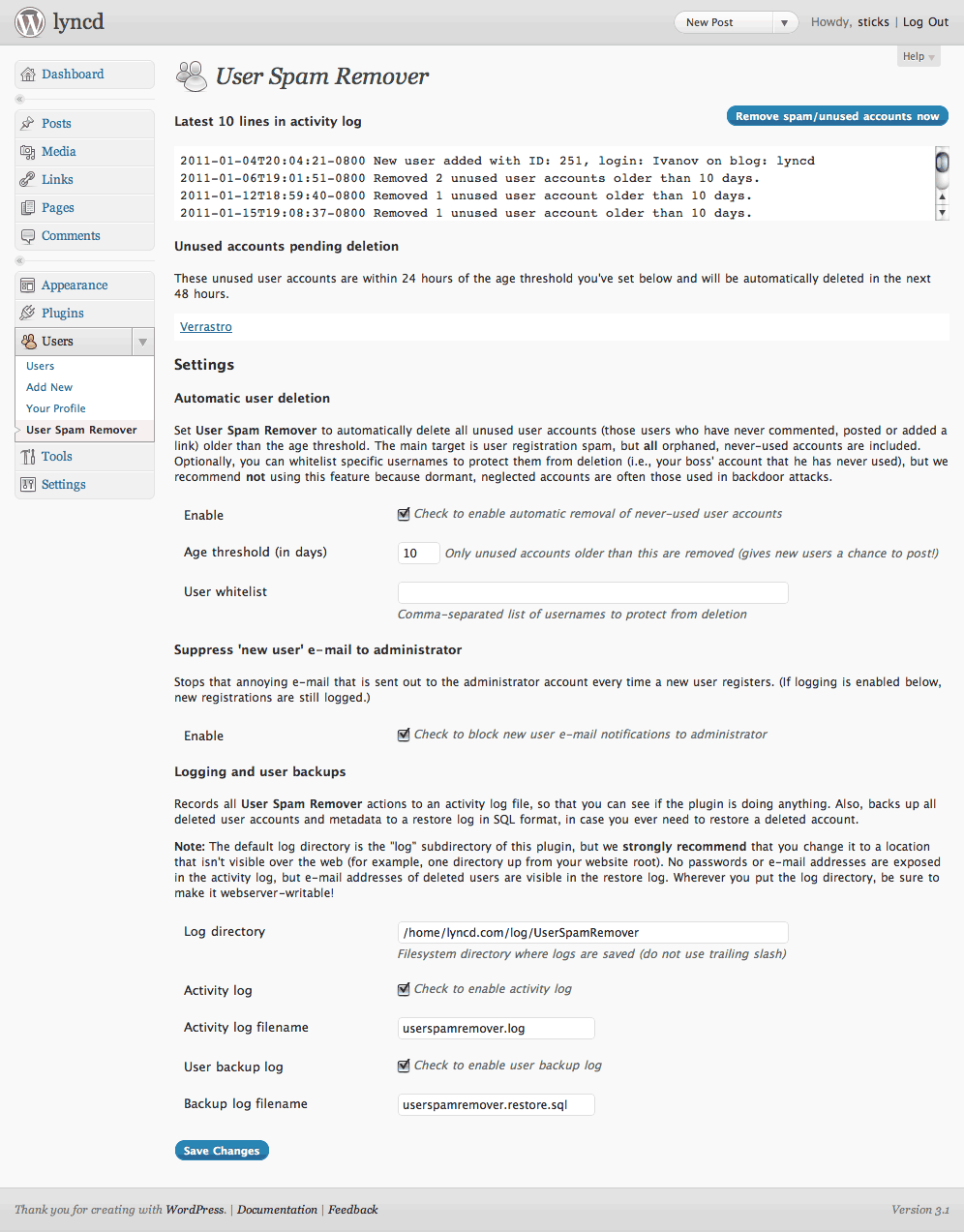
Configuration screenshot!
- Automatically deletes user registration spam and other orphaned, never-used accounts.
- Very simple, enable and go! Doesn’t interfere with the normal user registration process in any way. So, it doesn’t add captchas or activation or anything else — you’re free to use it alongside a plugin that does, if you like. (For more info on why I’ve written it this way, see the FAQ).
- Blocks notification e-mail that WordPress normally sends to the administrator every time a new user registers (instead, logs this event).
- Fully configurable, with grace period for new accounts and optional username whitelist.
- Fully logs all actions and backs up all user accounts that it deletes so that you can seamlessly restore them if you ever need to.
Installation
Note: Please report any bugs or issues you have in the comments below, so that I can make it better.
Requirements:
- WordPress 3.9+
- PHP 5.1+ (tested with PHP 5.2 through 7.0 series)
- MySQL using PHP
mysqliextension
To install:
- Download, unzip and upload into your plugins directory. (Or, install through the plugins menu in WordPress.)
- Go to the Plugins configuration screen in WordPress and activate. Look for the settings link to go to the User Spam Remover settings page (User Spam Remover also gets added to the left menu under “Users”).
- On the settings page, you’ll need to click the “Enable” checkbox to turn the plugin on. Scroll down and change any options you like. Click “Save Changes.”One note on logging: By default, all logging is enabled (good!), but the log directory is set to the
logsubdirectory of the plugin. While this is OK, it means your log files will be viewable over the web, so I recommend you change this directory to someplace else (i.e., if the root of your site is/www/mysite/html, do something like/www/mysite/log). Be sure to usechmodor your FTP program to make this directory webserver-writable (don’t worry, User Spam Remover will warn you if it’s not). - Once you’re done, that’s it! Feel free to use the blue “Remove spam/unused accounts now” button to test it out. User Spam Remover will run once a day automatically from now on.
Questions? Please see the FAQ.
Upgrading
There’s nothing special you need to know. Either upgrade through WordPress itself, or download the newest version, unzip and upload the new files.
Versions
See the changelog to see what’s new. First released in 2010. Version 1.0 was released on April 4, 2017.
Ping from 新推出的WordPress Plugins - 22/3 | Avocado Solutions
March 21, 2011, 7:47 pm
[…] User Spam Remover – 自動移除Spam,太舊或沒有使用的用家戶口 […]
grp362
March 26, 2011, 5:05 am
Neat plugin. As a semi-newbie, I deleted most of my member list when I pressed the wrong button before registering my white list.
How do I use the restore feature to put them back? I have access via phpmyadmin, but am not sure how to use it.
sticks
March 26, 2011, 2:04 pm
Check the FAQ for how to restore users. The backup file is in standard SQL format (i.e. a text file with a bunch of SQL statements in it).
The easiest thing to do is just to restore everything in the backup file. You can do this with “mysql < backupfile" or you can load the backup file into phpMyAdmin.
Ping from WordPress Blogs: How to Stop Spam | Teach Me Internet Marketing
March 28, 2011, 5:39 am
[…] For more information and installation instructions, please go to: /user-spam-remover/ […]
Ping from WordPress Blogs: How to Stop Spam
April 3, 2011, 8:33 am
[…] For more information and installation instructions, please go to: /user-spam-remover/ […]
Ping from WordPress Blogs: How to Stop Spam | How to setup a website
April 13, 2011, 7:25 am
[…] For more information and installation instructions, please go to: /user-spam-remover/ […]
Ping from Wordpress Plugins » Blog Archive » User Spam Remover
April 21, 2011, 6:21 am
[…] Spam Remover 21 April 2011 | Antispam Plugins | Es gibt keine Kommentare » | Das Plugin User Spam Remover löscht automatisch Spam, Registrationen und inaktive Benutzer. Ausserdem blockiert es die […]
chod
May 3, 2011, 8:38 pm
Any option to remove user who have no post in xx days?
Thanks.
sticks
May 3, 2011, 8:50 pm
No, the plugin’s goal is to remove spam user accounts (i.e. those who have *never* submitted a non-spam comment), not legitimate users who have merely been inactive for a long time.
You don’t really want to delete user records of users with posts, comments or links anyway, as that would break the database relations — better to just disable those accounts.
Ping from WordPress Blogs: How to Stop Spam | Spam Stop Articles
May 4, 2011, 8:53 pm
[…] For more information and installation instructions, please go to: /user-spam-remover/ […]
AstroGremlin
May 17, 2011, 8:44 pm
I am using WordPress TwentyTen and loved the idea of dealing with spammers without Captchas. I activated your plugin and not sure it’s doing what I think it’s intended to do. One strange thing though: I now get *two* copies of every request to moderate a comment. Weird, huh? Because it was made clear that not getting any e-mail on incoming comments was a feature. I’m just marking the spammers as spam for now (and deleting the extra e-mails!) Should I be using another Plugin to catch them in the first place, and how do I turn off the *extra* e-mails.
Appreciate your efforts to stop these annoying parasites.
AstroGremlin
sticks
May 17, 2011, 9:42 pm
This plugin is not for comment spam. It is for user registration spam!
I actually have written a comment spam plugin that I’ve been using for almost a year now, but haven’t decided how/if to release it. So, I can’t really help there … yet.
I would recommend you use my plugin alongside a comment spam plugin like Akismet. Of course, if you’re not getting any spam user registrations (for instance, if your site doesn’t allow the public to register), then you don’t need this plugin at all.
AstroGremlin
May 18, 2011, 5:20 pm
Thanks for your response. I *wish* I had enough traffic to get registration spam (assuming that’s a factor). My experience as a green WP blogger is that you can get zero traffic and still get comment spammers. It seems to be a small industry! Aksimet, as you know, comes bundled with WP. Have been hesitating to activate it, but looks like what I need to do. Appreciate your help!
Ping from WordPress Blogs: How to Stop Spam | The Vall
June 11, 2011, 9:58 pm
[…] For more information and installation instructions, please go to: /user-spam- remover / […]
Ping from WordPress Blogs: How To Stop Spam | Wordpress Theme Plugin Tutorial Tips Download
June 17, 2011, 10:19 pm
[…] For more information and installation instructions, please go to: /user-spam-remover/ […]
Kevin
Oct. 10, 2011, 6:01 pm
Hi, thanks for a great plugin! The only thing I would like to see added in the future is the ability to delete only accounts that have not been activated, regardless of whether they have or have-not made any posts or comments. Thanks!
Ping from WordPress Blogs: How to Stop Spam | 101DesignBlog.com
Oct. 13, 2011, 5:12 pm
[…] For more information and installation instructions, please go to: /user-spam-remover/ […]
Ping from - Politector
Oct. 14, 2011, 1:44 pm
[…] For more information and installation instructions, please go to: /user-spam-remover/ […]
Media Tower
Nov. 18, 2011, 3:22 am
wow.. your user spam remover is really fantastic!! :) … Removed 152 unused user accounts within 1 sec :)
thank you for saving my time,
Helmuts
virginads
Michele
Dec. 12, 2011, 9:49 am
Hi.
I just released that user spam remover has removed a user who had logged in a few days ago, but Age threshold is set to 400 days. My suspect is that my system is using european date format and this messes up with the plugin…. can this be the reason?
Thanks.
sticks
Dec. 12, 2011, 10:39 am
Sorry, but it’s nothing to do with that — datetimes are stored in GMT/UTC format that is timezone-independent (in WordPress, in my plugin, in MySQL, in pretty much any reasonable software).
Please reread how the plugin works — it has nothing to do with whether users log in or not. It removes accounts that have never created a post, comment, link or anything else. I’m sorry for your troubles, but this has been discussed a lot.
Happy Camper
Dec. 17, 2011, 4:17 am
I had 14400 fake users, started deleting them the old fashioned way, it didnt take long to work out this was going to take 13 years to do. Found your plugin and problem solved in 20 seconds.
Ping from WordPress Blogs: How to Stop Spam | increasetraffictowebsites.com
Feb. 7, 2012, 11:50 pm
[…] For more information and installation instructions, please go to: /user-spam-remover/ […]
Ping from WordPress Blogs: How to Stop Spam « Wordpress Settings « Wordpress Skills
March 2, 2012, 3:57 pm
[…] For more information and installation instructions, please go to: /user-spam-remover/ […]
Ping from Takula » Useful Free Admin Plugins For WordPress » Takula
March 28, 2012, 10:44 am
[…] User Spam Remover: Information | Download […]