User Spam Remover for WordPress
User Spam Remover is a plugin for WordPress that automatically removes spam user registrations and other old, never-used user accounts. It also blocks the notification e-mail that WordPress normally sends to the administrator whenever a new user registers (annoying when that registration is spam!) and logs it instead.
The plugin adds a configuration panel so that all of these options can be turned on or off, and it logs and fully backs up all user accounts that it deletes, so that you can restore them if you need to.
Features
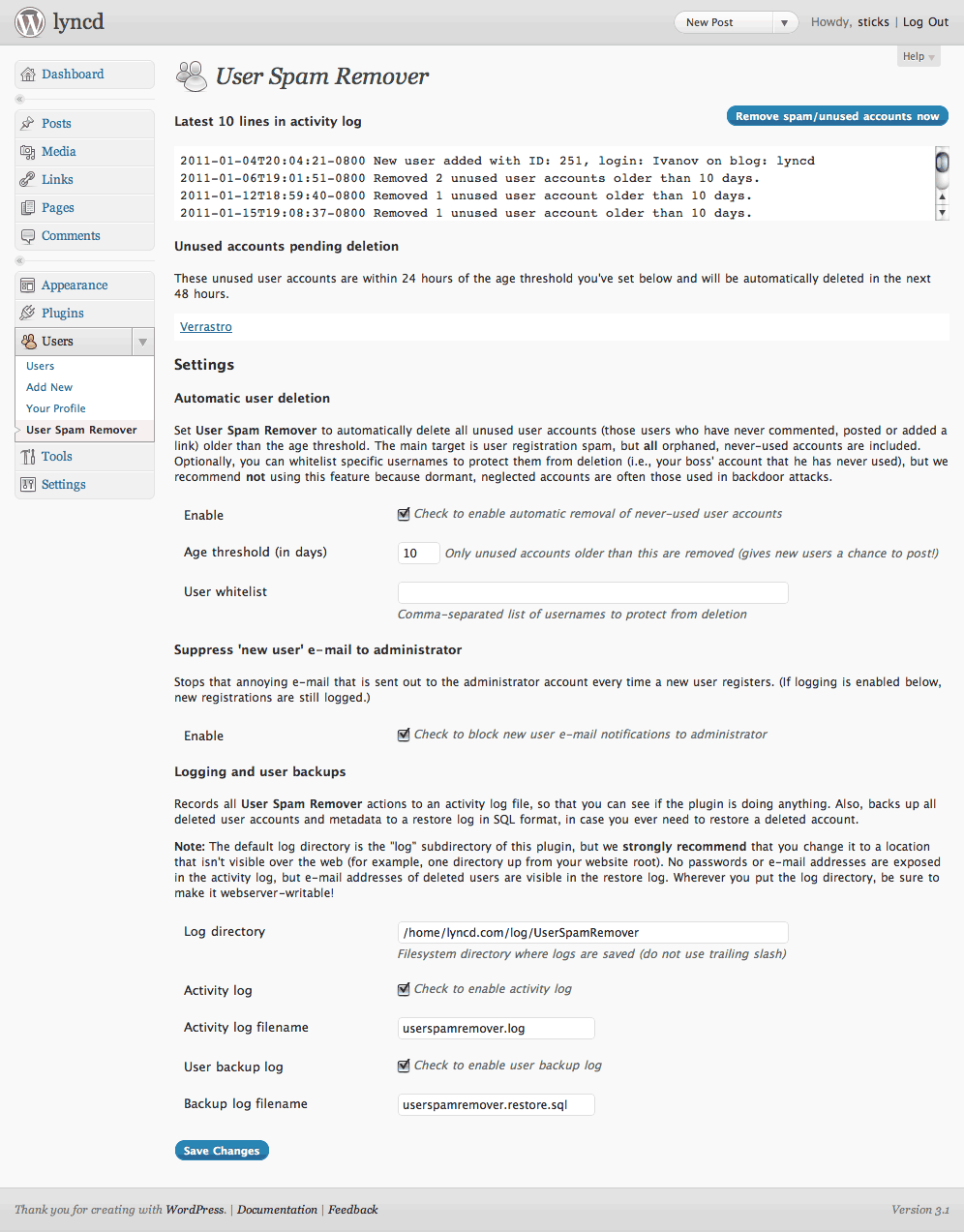
Configuration screenshot!
- Automatically deletes user registration spam and other orphaned, never-used accounts.
- Very simple, enable and go! Doesn’t interfere with the normal user registration process in any way. So, it doesn’t add captchas or activation or anything else — you’re free to use it alongside a plugin that does, if you like. (For more info on why I’ve written it this way, see the FAQ).
- Blocks notification e-mail that WordPress normally sends to the administrator every time a new user registers (instead, logs this event).
- Fully configurable, with grace period for new accounts and optional username whitelist.
- Fully logs all actions and backs up all user accounts that it deletes so that you can seamlessly restore them if you ever need to.
Installation
Note: Please report any bugs or issues you have in the comments below, so that I can make it better.
Requirements:
- WordPress 3.9+
- PHP 5.1+ (tested with PHP 5.2 through 7.0 series)
- MySQL using PHP
mysqliextension
To install:
- Download, unzip and upload into your plugins directory. (Or, install through the plugins menu in WordPress.)
- Go to the Plugins configuration screen in WordPress and activate. Look for the settings link to go to the User Spam Remover settings page (User Spam Remover also gets added to the left menu under “Users”).
- On the settings page, you’ll need to click the “Enable” checkbox to turn the plugin on. Scroll down and change any options you like. Click “Save Changes.”One note on logging: By default, all logging is enabled (good!), but the log directory is set to the
logsubdirectory of the plugin. While this is OK, it means your log files will be viewable over the web, so I recommend you change this directory to someplace else (i.e., if the root of your site is/www/mysite/html, do something like/www/mysite/log). Be sure to usechmodor your FTP program to make this directory webserver-writable (don’t worry, User Spam Remover will warn you if it’s not). - Once you’re done, that’s it! Feel free to use the blue “Remove spam/unused accounts now” button to test it out. User Spam Remover will run once a day automatically from now on.
Questions? Please see the FAQ.
Upgrading
There’s nothing special you need to know. Either upgrade through WordPress itself, or download the newest version, unzip and upload the new files.
Versions
See the changelog to see what’s new. First released in 2010. Version 1.0 was released on April 4, 2017.
Ping from Useful Free Admin Plugins For WordPress : .:Webb0lled.Com:.
April 1, 2012, 4:34 am
[…] Spam Remover: Information | […]
Ping from WordPress Blogs: How to Stop Spam | Captchas.biz
April 30, 2012, 3:58 pm
[…] For more information and installation instructions, please go to: /user-spam-remover/ […]
Ping from Necessary Free Admin Plugins For WordPress | WordPress Planet
Oct. 6, 2012, 4:33 am
[…] Spam Remover: Information | […]
Ping from Remove Wordpress Spam User Accounts with User Spam Remover - WP Cypher
Dec. 8, 2012, 6:23 pm
[…] dragonblogger User Spam RemoverRating: 5WordPress Plugin: Joel HardiPrice: FreeReviewed by: dragonbloggerOn December 9, 2012Last […]
Jim McDaniel
Dec. 29, 2012, 9:23 am
12/2012 There is a problem with the User White list. If a user ID contains a space, your code will not accept it. For example ‘John Doe’ will be converted by your code to ‘John, Doe’ so the actual user name will not be recognized in the white list.
Jim McDaniel
Dec. 29, 2012, 9:25 am
I forgot to add that when I tried double quoting the user name, “John Doe”, your code still converted it to John,Doe. Otherwise the plug-in looks useful.
Tom
Feb. 10, 2013, 9:24 am
When I activate your plugin, which I think is great by the way, it breaks another plugin called “WP Welcome Email Editor.” Since I have open registration on my site, I find both of these plugins to be absolutely necessary to get along with each other. I’m not sure what is going on behind the scenes to break it, but thought I would let you know. I’ll comment at the other plugin site. Perhaps you two could talk to each other? http://www.sean-barton.co.uk/wordpress-welcome-email-editor
Mark
Oct. 19, 2014, 9:57 am
I get this error when I try to activate the plugin. Version is 0.9.8
Fatal error: Uncaught exception ‘UserSpamRemoverException’ with message ‘Could not SHOW INDEX on database table wp_comments. ‘ in /nas/wp/www/cluster-2210/stephanieh57/wp-content/plugins/user-spam-remover/user-spam-remover.php:820 Stack trace: #0 /nas/wp/www/cluster-2210/stephanieh57/wp-content/plugins/user-spam-remover/user-spam-remover.php(796): UserSpamRemover->checkMySQLIndex(‘comments’, ‘user_id’) #1 /nas/wp/www/cluster-2210/stephanieh57/wp-content/plugins/user-spam-remover/user-spam-remover.php(144): UserSpamRemover->checkMySQL() #2 [internal function]: UserSpamRemover::activate(”) #3 /nas/wp/www/cluster-2210/stephanieh57/wp-includes/plugin.php(505): call_user_func_array(Array, Array) #4 /nas/wp/www/cluster-2210/stephanieh57/wp-admin/plugins.php(155): do_action(‘activate_user-s…’) #5 {main} thrown in /nas/wp/www/cluster-2210/stephanieh57/wp-content/plugins/user-spam-remover/user-spam-remover.php on line 820
sticks
Oct. 19, 2014, 2:03 pm
What WordPress and PHP versions is this with? Do you have the PHP mysqli extension enabled?
F Kapnistos
Dec. 20, 2014, 7:43 am
It worked until I updated WordPress. What happened? I got 10000 zombie users! Now I get this message:
Your WordPress installation is not configured to use the PHP mysqli extension to connect to MySQL. This is required by the plugin. Please refer to the documentation for more information.
sticks
Dec. 20, 2014, 9:01 am
Yes, please see the readme, there’s additional information/instructions. There have also been a couple of support threads to answer questions about the 0.9.8 version of the plugin, which now requires that your PHP and WordPress use the `mysqli` extension instead of the old old `mysql` one. Basically you probably just need to add this one line to your `wp-config.php` and you should be fine:
define(‘WP_USE_EXT_MYSQL’, FALSE);
Back story:
1. 10 years ago PHP added a new database driver extension called `mysqli` so that PHP can connect to MySQL. The old/original one is called just `mysql` and has a lot of problems.
2. 1 year ago, WordPress core finally got around to using this extension. However they still didn’t make it the default for some reason.
3. So I updated the plugin and it now requires `mysqli`. If you want to still use `mysql` instead you’re welcome to use the older version of the plugin, there are no bugs/known issues with it. Otherwise just add the one-liner to your `wp-config.php` and you should be good, for the next 10 years at least.
Ping from User Spam Remover | WP Plugin Directory
Dec. 22, 2014, 11:33 pm
[…] For more information and installation instructions, please go to: /user-spam-remover/ […]
Ping from Most Useful Free Admin Plugins For WordPress
March 22, 2015, 7:07 am
[…] Spam Remover: Information | […]
evelyn
April 7, 2015, 11:42 am
I tried to activate this plugin and it triggered a fatal error and said my site is not set up to use mysqli.. any suggestions?
Thanks,
Evelyn
evelyn
April 7, 2015, 12:12 pm
I added define(‘WP_USE_EXT_MYSQL’, FALSE); to my config file and still getting fatal error when I try to activate.
any ideas?
Evelyn
sticks
April 9, 2015, 3:44 pm
Hmmm, could be a number of things, most likely not the plugin. Have you checked that your PHP install has mysqli enabled? You can do this with a phpinfo().
You’re also welcome to use version 0.9.1 of the plugin, the last version to not require mysqli, which has no known issues.